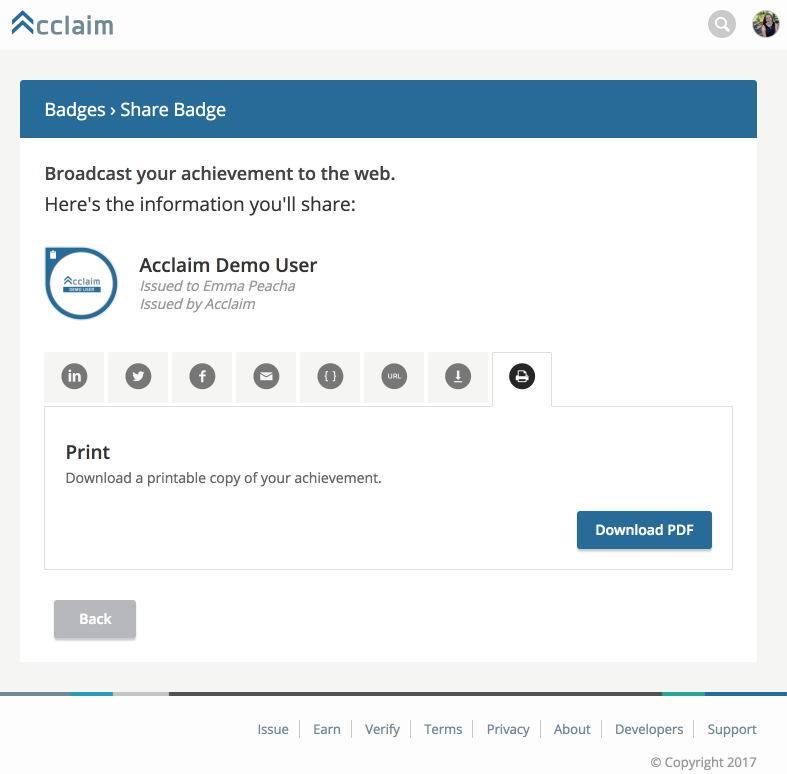
Earners are now able to print their badge directly from Acclaim. To print a PDF version of your badge, please follow these instructions:

  1. Log into your account on youracclaim.com
  2. Click on the badge you’re looking to print
  3. Click “Share”
  4. This will bring you to the “Share Badge” page
  5. Click on the print tab and then click “Download PDF”
  6.  
    Badge 1 
     
  7. In a few seconds, a PDF version of your badge will be downloaded to your computerBadge 2
  8.  
  9. Send and share digitally, or print it to show it off.
Upcoming Events
January
13
CTS 1: AV Technology (Previously Essentials of AV Technology)- Virtual Classroom, January 2026

CTS 1 establishes the foundational knowledge required for aspiring AV professionals.

January
28
Enterprise IT Power Hour: How to Get Kicked off a Corporate Network Without Even Trying

Join this eye-opening look at the everyday mistakes that can get devices booted from a corporate network.

February
03
ISE 2026

Find all AVIXA activities, discount codes and member benefits on one page.