
Updated on June 12, 2026
What Is Live Streaming Architecture?
Live streaming architecture is the end-to-end technical infrastructure that captures, processes, encodes, transports, and delivers video in real time. Whether you are broadcasting a boardroom presentation to a global workforce, streaming a sporting event to thousands of viewers, or running a hybrid conference with remote contributors, every live stream depends on the same fundamental chain of components working in harmony.
For businesses, the stakes are higher than for consumer use cases. A dropped frame on a Twitch gaming stream is an irritant; a dropped frame during a global product launch or a shareholder meeting is a reputational and financial risk. Understanding the architecture — and choosing components that are specified correctly for the job — is what separates a professional production from an amateur one.
The Core Signal Chain
Every live stream, regardless of scale, follows the same logical path:
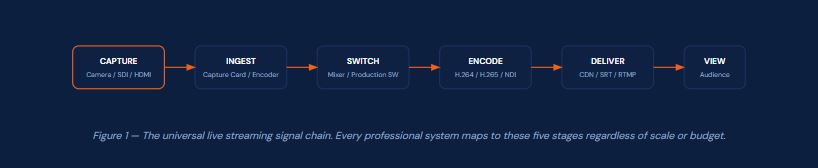
The hardware and software you select for each stage determines your stream's reliability, quality, latency, and total cost of ownership. This guide works through each stage in depth, with technical specifications, brand comparisons, and real-world configuration advice drawn from over two decades of broadcast engineering practice.
💡 UK Availability Note: All Magewell products referenced in this guide are available in UK stock through iView Data Ltd with same-day dispatch. iView Data is an authorised UK Magewell supplier based in Leicester.
Understanding Hardware Tiers: Consumer, Prosumer, and Broadcast
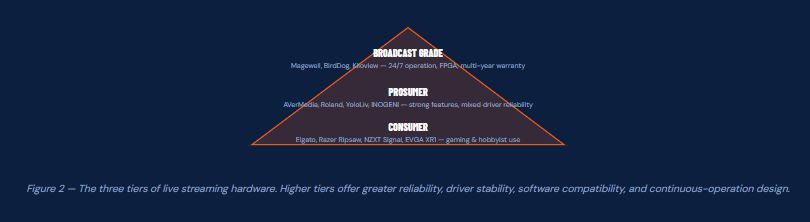
One of the most common mistakes businesses make when building a live streaming system is choosing hardware from the wrong tier for their use case. The capture card market spans a wide range — from sub-£30 consumer dongles to multi-thousand-pound broadcast-grade systems — and the differences are not simply cosmetic.
What Separates the Tiers?
Consumer tier products (Elgato, Razer Ripsaw, NZXT Signal, EVGA XR1) are designed for gaming and hobbyist streaming. They typically require proprietary drivers, offer limited software compatibility, carry 1–2 year warranties, and are not rated for continuous operation. They are excellent for their intended purpose but unsuitable for business-critical deployments.
Prosumer tier products (AVerMedia Live Gamer series, Roland V-1HD, YoloLiv YoloBox, INOGENI SHARE2U) bridge the gap. Many offer professional features at accessible price points, though software driver reliability and long-term vendor support vary considerably between brands.
Broadcast grade products (Magewell, BirdDog, Kiloview) are engineered for 24/7 operation in demanding environments. They use FPGAs for hardware-accelerated processing, carry extended warranties, use standardised drivers (UVC for USB devices), and are tested extensively for compatibility with professional production software including OBS, vMix, Wirecast, Zoom, Teams, NewTek TriCaster, and broadcast playout systems.
Capture Cards Deep Dive: USB, PCIe, and Thunderbolt
A capture card bridges the gap between your video source — camera, console, medical imaging system, presentation PC, or broadcast feed — and your production software. Understanding the technical differences between form factors is critical to making the right specification decision.
USB Capture Devices
USB capture devices are the most versatile option for modern deployments. They require no internal PCIe slot, making them compatible with laptops and compact desktop systems. The most important distinction in the USB category is whether a device uses the UVC (USB Video Class) standard or a proprietary driver architecture.
Magewell USB Capture devices implement UVC natively. This means they present themselves as a standard webcam to any operating system — Windows, macOS, Linux, ChromeOS — without requiring any additional drivers. The practical consequence is complete compatibility with any software that accepts a webcam input, and immunity to driver breakage caused by OS updates. Consumer devices from Elgato, Razer, and NZXT use proprietary drivers which have a documented history of breaking following Windows major updates, requiring firmware releases to restore functionality.
The Magewell Ultra Encode HDMI represents a further evolution: a standalone hardware encoder that requires no host computer at all, encoding and streaming directly to platforms or IP destinations from HDMI input.
PCIe Capture Cards
PCIe cards install directly onto the motherboard's PCIe bus, offering the lowest possible latency and highest available bandwidth for multi-channel capture. They are the correct choice for permanent installations — broadcast studios, medical imaging, surveillance integration, and fixed event production desks. The Magewell Pro Capture range uses a PCIe x1 or x4 interface and supports multiple simultaneous capture streams from a single input channel, with independent resolution, frame rate, colour format, and crop settings per stream.
Common Mistake: Many organisations purchase consumer PCIe gaming capture cards for business deployments due to their lower upfront cost. These devices are not designed for continuous operation and frequently exhibit driver instability, incompatibility with enterprise production software, and no support for professional colour spaces (4:4:4, HDR). The total cost of ownership — including support time, failed streams, and eventual replacement — consistently exceeds the cost differential versus professional-grade hardware..
Key Technical Specifications to Evaluate
Maximum input resolution and frame rate — Does it capture your signal natively? (4K60, 1080p120, etc.)
Colour sampling support — 4:4:4 vs 4:2:2 vs 4:2:0 matters for colour-accurate workflows
Loop-through output — Essential for zero-latency monitoring; not all cards have this
HDR support — HDR10 passthrough or capture for modern camera workflows
Driver model — UVC (driverless) vs proprietary
Processing architecture — FPGA onboard vs host CPU dependent
Power consumption — Bus-powered USB vs externally powered vs PCIe slot power
Warranty duration — 1 year (consumer) vs 2–3 years (professional)
Hardware Encoders: Why They Matter for Business Streaming
A hardware encoder is a standalone device that takes a video input and produces a compressed, network-ready stream — without requiring a host computer to perform encoding. This is architecturally different from a capture card, which delivers raw or lightly processed video to a host PC for software encoding.
For business deployments, hardware encoders offer three decisive advantages over software-based encoding on a PC: they free the host computer from the CPU/GPU load of encoding; they operate continuously without OS-related reliability issues; and they can be deployed in locations where a full production PC is impractical (remote venues, camera positions, unmanned satellite feeds).
Magewell Ultra Encode Series
The Magewell Ultra Encode HDMI is a compact, camera-mountable encoder that accepts an HDMI 1.4a input and streams H.264/H.265 content at bitrates up to 16Mbps to multiple simultaneous destinations using RTMP, RTMPS, SRT, RTSP, HLS, and NDI|HX protocols. Its small form factor (106.7mm × 106.7mm × 25.4mm) and Wi-Fi plus Gigabit Ethernet connectivity make it ideal for decentralised production architectures where individual camera positions encode independently.
The Magewell Ultra Encode HDMI Plus expands on this with native 4K encoding from HDMI 2.0 input, simultaneous multi-protocol streaming, higher streaming bitrates, and file recording capability — a significant step up for permanent installations requiring broadcast-grade delivery.
Kiloview E3
The Kiloview E3 is a dual-input encoder accepting both HDMI (up to 4Kp30) and 3G-SDI (up to 1080p60) simultaneously. It supports H.265, H.264, and NDI HX2/HX3 encoding with protocols including SRT, RTMP, RTSP, UDP, HLS, and TS-over-UDP. The built-in LCD display and web-based management interface make configuration accessible without additional software. It is a well-specified encoder for cost-conscious installations needing both SDI and HDMI flexibility.
YoloLiv YoloBox Series
The YoloLiv YoloBox and YoloBox Mini represent an all-in-one approach combining encoder, switcher, and touchscreen monitor in a single portable unit. The YoloBox Mini's 5.5-inch touchscreen, built-in 4G LTE connectivity, and sub-£600 price point make it compelling for solo operators producing live sports, worship, or corporate events from the field. Maximum capture is 1080p60 with simultaneous multi-platform streaming. It is not a replacement for a full production system but fills a specific niche for compact deployments.
Video Switchers and All-in-One Production Systems
A video switcher takes multiple input sources and allows the operator to select, mix, and transition between them in real time to produce a programme output. For organisations moving beyond single-camera streaming, a switcher is the architectural centrepiece of the production system.
Blackmagic Design ATEM Mini Series
The Blackmagic ATEM Mini range has become the reference for entry-to-mid-level live production. The ATEM Mini Pro ISO adds ISO recording of all five video streams (four inputs plus programme) to a USB-C connected SSD, with an automatic DaVinci Resolve project file generated for post-production editing. Its four HDMI inputs, built-in streaming directly to YouTube, Facebook, and Twitch, and competitive pricing have made it ubiquitous in corporate, faith, and education streaming. Key limitations include absence of SDI connectivity and a maximum output resolution of 1080p.
Roland V-Series
Roland's V-1HD and V-1HD+ offer four HDMI inputs with a hardware control surface, providing a tangible physical mixing experience appreciated by operators who prefer tactile control over software interfaces. The V-1HD+ adds input scaling and two microphone preamps. Roland's build quality and long-term driver reliability are consistently strong, and the physical form factor makes them well suited to house-of-worship and corporate AV installations.
Magewell Director Series
The Magewell Director Plus represents the high end of all-in-one production systems, combining a 7-inch 800-nit AMOLED touchscreen, four HDMI 2.0 inputs, two USB AV inputs, ten simultaneous live IP sources, 5G modem, Wi-Fi 6E, 2.5G Ethernet with multi-link bonding, and four-channel ISO recording to 128GB internal storage plus SD and USB SSD. It streams simultaneously to four platforms at up to 120Mbps 4K60. The hot-swappable NP-F battery system enables uninterrupted field operation — a significant operational advantage for remote production teams.
For teams needing multi-camera IP production with the Director ecosystem, see also the Director Mini and Director One for the appropriate scale of deployment. Read our Director Plus solutions and use cases guide for real-world deployment scenarios.
Streaming Protocols: SRT, NDI, RTMP, HLS, and Beyond
Choosing the right transport protocol is one of the most consequential technical decisions in a streaming architecture. The same hardware can behave very differently depending on which protocol it uses to move video from one point to another.
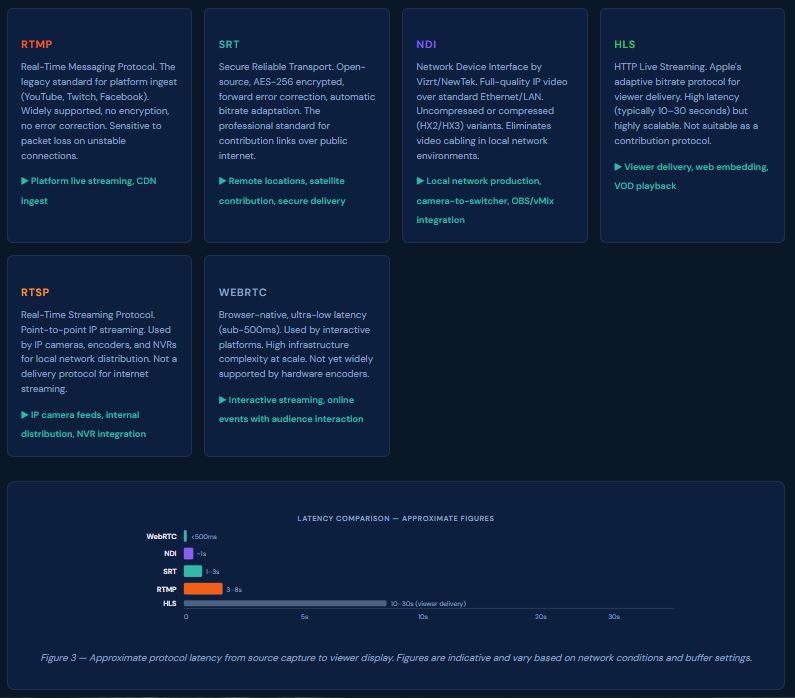
SRT vs RTMP — The Professional Choice: For any deployment where the stream must traverse the public internet — remote venues, cloud contribution, multi-site corporate events — SRT should be specified over RTMP. SRT's forward error correction rebuilds corrupted packets before they reach the decoder, preventing visible artefacts on packet loss of up to several percent. Magewell Ultra Encode, Kiloview E3, and BirdDog encoders all support SRT natively.
Full Brand Comparison: Capture Cards & Streaming Hardware 2025
The following tables compare the most commonly evaluated products across the professional, prosumer, and consumer categories. Specifications have been verified against official manufacturer documentation as of June 2025. All prices are approximate UK RRP inclusive of VAT.
Citation Note for Journalists & Publishers: This comparison table represents independently researched data compiled by iView Data Ltd. You are welcome to link to or cite this page. For PDF download with full references, see the download section below. Please credit: iView Data Ltd, Ultimate Live Streaming Guide, iviewdata.com/ultimate-live-streaming-guide/
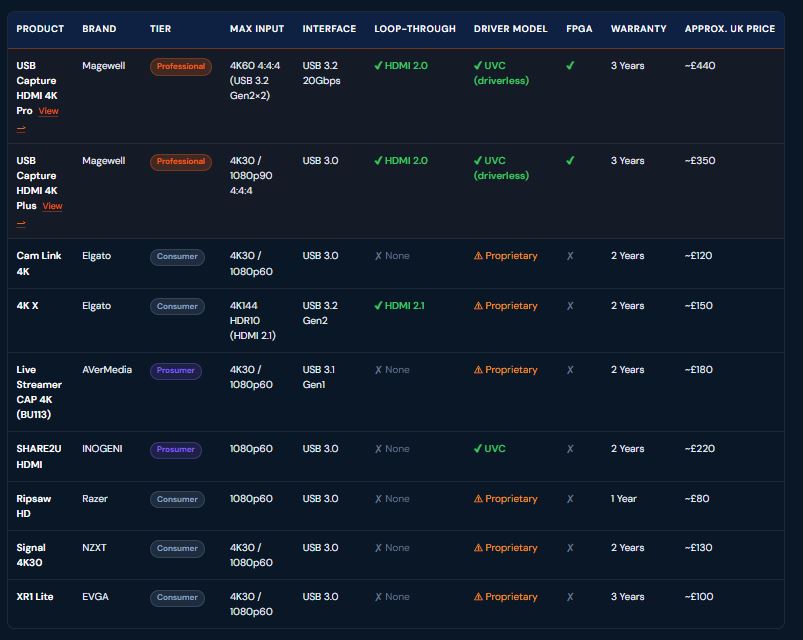
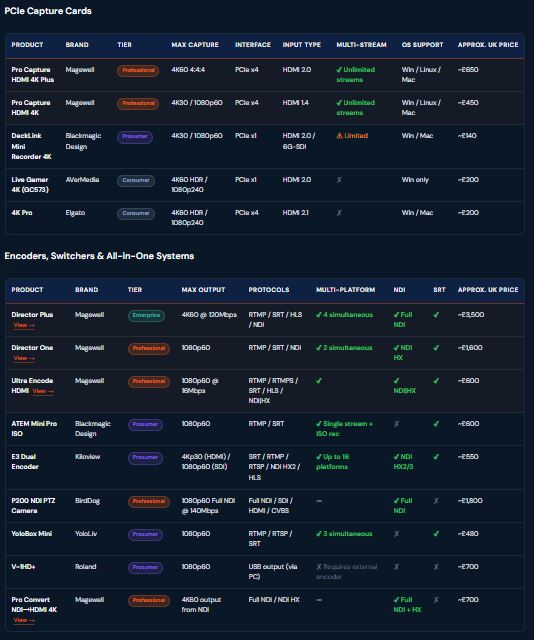
Prices are approximate UK RRP including VAT as of June 2025 and may vary by retailer. Magewell products are available directly from iviewdata.com with UK stock and same-day dispatch.
Live Streaming Architecture Diagrams
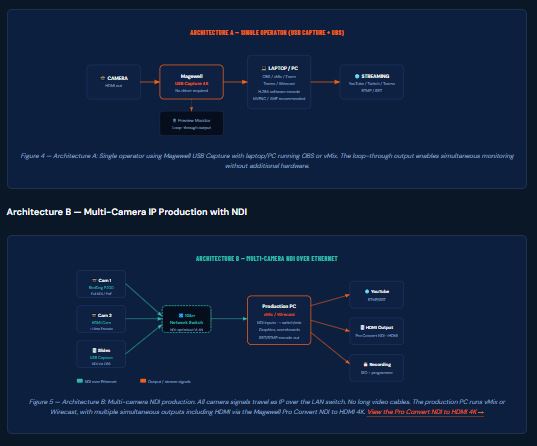
The following diagrams illustrate three common production architectures encountered in business deployments, from a minimal single-operator setup through to a full multi-site IP production infrastructure.
Architecture A — Compact Single-Operator Setup
Real-World Troubleshooting: Common Problems & Fixes
The following issues are drawn from real questions appearing in streaming communities including the OBS Project forums, AV Forums, Reddit's r/streaming and r/livevideo, and direct support queries received by iView Data.
OBS "Encoding Overloaded" Error
The CPU or GPU cannot process and encode frames in real time. Common when running complex OBS scenes, gaming simultaneously, or using x264 software encoding at high resolutions.
Fix: Switch to hardware encoding (NVENC for NVIDIA, AMF for AMD, QSV for Intel). Lower output resolution from 1080p to 720p. Reduce OBS scene complexity. Use a dedicated hardware encoder like the Magewell Ultra Encode to remove encoding load from the PC entirely.
Dropped Frames / High Packet Loss
Frames are being dropped between the encoder and the streaming platform. Almost always a network issue, not an OBS or capture card issue.
Fix: Switch from Wi-Fi to wired Ethernet. Lower your streaming bitrate by 20–30%. Test connection to the CDN server using the OBS auto-configuration wizard. For unstable connections, switch from RTMP to SRT which handles packet loss gracefully. Check firewall and antivirus are not throttling the stream.
Capture Card Not Detected in OBS
The capture device does not appear as a Video Capture Device source in OBS, or appears but shows black output.
Fix: Magewell UVC devices require no drivers — if not detected, try a different USB 3.0 port (not a USB hub). For Elgato/AVerMedia: reinstall the latest drivers from the manufacturer's site. Check HDCP — most capture cards cannot capture HDCP-protected sources (Blu-ray, some consoles). In OBS, set the capture device to the correct resolution/format manually.
NDI Audio/Video Sync Drift
Audio gradually drifts out of sync with video when using NDI sources in OBS or vMix. Common with long streams over mixed-quality networks.
Fix: Enable "Use network timestamp" in the NDI source settings. Use dedicated wired Ethernet for NDI traffic — not Wi-Fi. In OBS Advanced Audio Properties, add a fixed audio offset to compensate for measured drift. Use a hardware NDI encoder (Magewell, BirdDog) which provides a hardware clock reference for consistent timing.
Green Screen / Purple Artefacts on Capture
Captured image shows colour corruption, green/purple blocks, or static noise. Often seen with consumer capture cards after Windows updates.
Fix: Update or reinstall capture card drivers. Check USB cable — use the cable supplied with the device. Try a different USB controller (PCIe USB card rather than motherboard USB). For consumer Elgato/AVerMedia devices, check the manufacturer's forum for firmware updates. Magewell UVC devices are immune to this issue as they do not use custom drivers.
SRT Stream Connects But No Video
SRT connection establishes successfully but the receiving decoder shows blank output or the encoder shows it is sending but the destination receives nothing.
Fix: Verify SRT mode — Caller vs Listener must be opposite at each end. Check the passphrase and latency values match exactly on both sides. Ensure the receiving port is open in the destination firewall. For Kiloview and Magewell encoders, verify the stream ID if using a CDN relay. Test with latency set to 120ms as a baseline before tuning.
Black Screen on Loop-Through Monitor
The capture device is passing signal to the production software correctly but the loop-through monitor shows black or no signal.
Fix: Loop-through on Magewell devices is hardware-level and always active regardless of software state — verify the monitor accepts the input resolution. Check the HDMI cable on the loop-through port. Some monitors require HDMI hot-plug detection — power-cycle the monitor with the cable connected. Ensure the signal source is active before connecting the monitor.
Stream Quality Degrades Over Time
Stream starts at acceptable quality but degrades visibly after 10–30 minutes. Increasing blocking artefacts or resolution drops.
Fix: Monitor CPU/GPU temperature — thermal throttling from overheating causes encoder performance degradation. Check for bitrate congestion at the CDN using platform analytics. On hardware encoders like Magewell Ultra Encode, verify the encoding bitrate setting in the web interface matches the platform's ingest limit. Ensure the streaming PC has adequate RAM — less than 8GB with OBS can cause memory pressure over long streams.
Pre-Stream Production Checklist
This checklist is designed to be shared with your team, printed for the production desk, or included in your streaming runbook. It covers the minimum verification steps before going live on any business-critical stream.
Pre-Stream Technical Checklist
All camera and source signals confirmed active and displayed in production software
Capture card loop-through verified — monitoring signal confirmed on preview monitors
Audio levels checked — no clipping on any channel. Target -14 LUFS for streaming platforms
Encoder bitrate set correctly for target platform (YouTube: 4,500–9,000 Kbps for 1080p60)
Stream key verified — tested on a private/unlisted stream before go-live
Network connection confirmed wired — Wi-Fi disabled on streaming PC/encoder
Upload speed tested — should be at least 2× your stream bitrate with headroom
OBS / vMix scene transitions reviewed — correct scenes on Preview and Programme
Lower thirds and graphics tested — correct names, titles, logos
Recording started (if ISO or local backup required)
Secondary stream destination verified (if multi-platform streaming)
Platform stream health confirmed green — buffer indicator, bitrate confirmed
On-screen timer / clock visible to operator for timing cues
Backup internet connection ready — 4G/5G hotspot or secondary ISP line
Post-stream: recording stopped cleanly, files backed up, stream key rotated if required
Sid Ahmed
Broadcast & Streaming Specialist — iView Data Ltd
Sid Ahmed is a seasoned broadcast and streaming specialist with over 20 years of hands-on experience across IP video workflows, live streaming systems, and professional video capture. His background spans end-to-end broadcast operations, IP-based network design, and advanced CCTV infrastructure, making him a trusted expert in delivering reliable, high-quality video solutions for corporate, media, and security environments. As part of the team at iView Data Ltd, the UK's authorised Magewell supplier, Sid advises clients on hardware specification, system architecture, and production workflow design.