
Updated on April 28, 2026
Upgrading Legacy Kiosks to Edge AI
Don’t Rip and Replace: Adding 26 TOPS of AI to Legacy Kiosks for Under $200
See us at InfoComm #6001
The most expensive phrase in the self-service industry is “end of life.”
AI accelerators for your PCs — This is a look at Hailo upgrade to PC. We also compare to the Giada alternative and cover Coral and Dragonwing as well.
https://keefner3.gumroad.com/l/nfsqh — Retrofit or Replace Decision Worksheet — xls + ROI calculator.
======================
For deployers managing 500+ kiosks in the field, the pressure to add modern features—like computer vision for loss prevention or facial authentication for check-in—usually comes with a terrifying price tag: replacing the entire PC.
If your fleet is running on standard Intel Core i5 or i3 processors from three or four years ago, those chips are perfectly capable of running Windows and your transaction app. They just fail at AI. They don’t have the NPU (Neural Processing Unit) required to process video streams in real-time without crashing the CPU.
The solution isn’t a forklift upgrade. It’s probably just a retrofit.
Enter the Hailo-8 AI Module.
What is the Hailo-8?
Think of it as a graphics card, but for AI, shrunk down to the size of a stick of gum.
The Hailo-8 is an M.2 AI Accelerator module. It fits into the same slot on your motherboard that you would typically use for a WiFi card or an NVMe SSD. Once installed, it acts as a dedicated brain for artificial intelligence tasks.
Performance: It delivers up to 26 TOPS (Trillions of Operations Per Second).
Efficiency: It typically consumes less than 2.5W of power, meaning you don’t need to upgrade your kiosk’s power supply or add massive cooling fans.
The Cost: The industrial-grade module typically retails between $170 and $200.
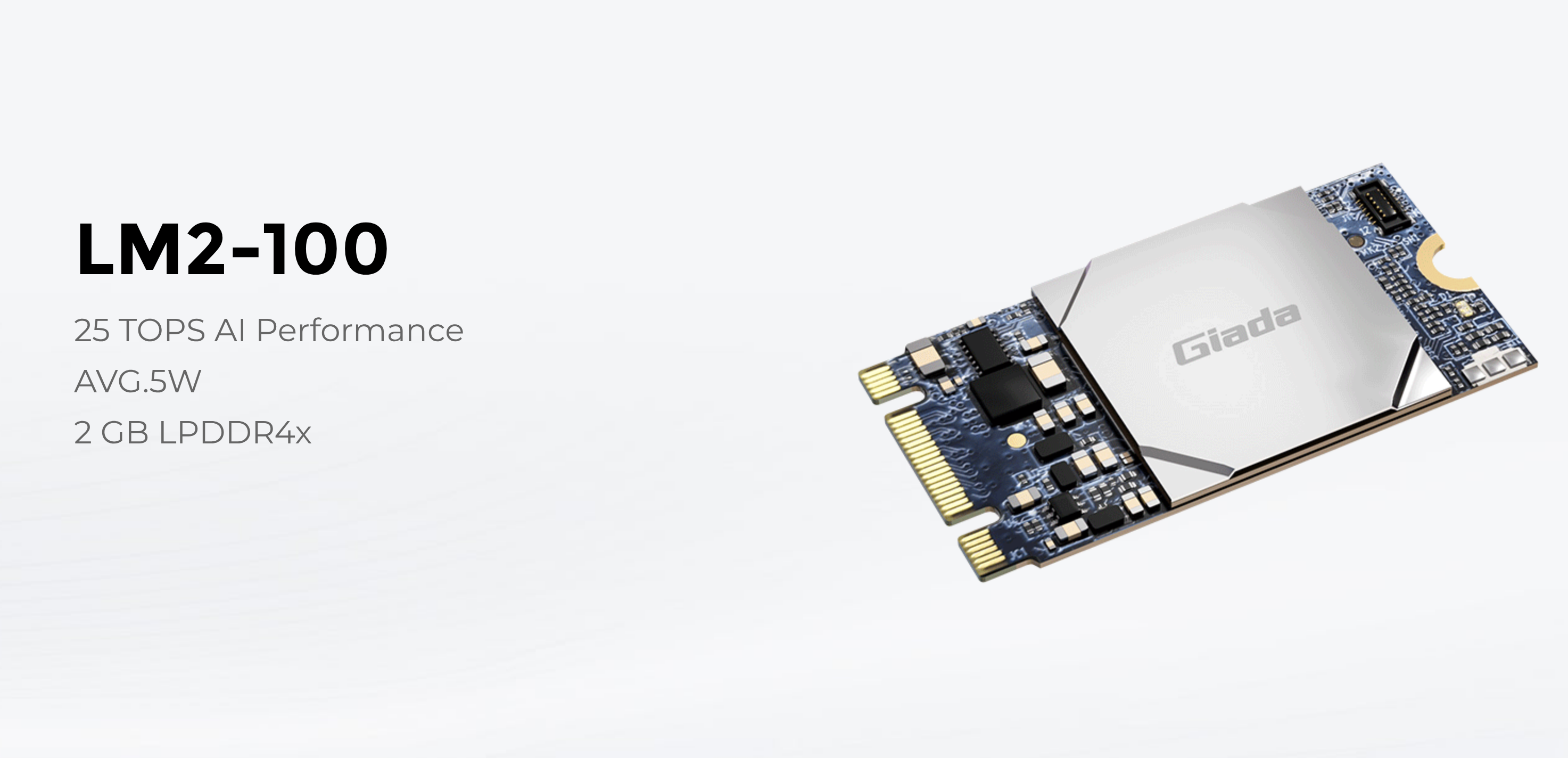
And then there is LM2-100 from Giada (Shenzhen JIEHE Technology)
The Math: New PCs vs. The Retrofit
Let’s look at the ROI for a fleet of 500 kiosks.
Scenario A (The Rip and Replace): You buy 500 new industrial PCs with integrated NPUs (like the new Intel Core Ultra).
Cost: ~$800 per PC + labor to swap them out.
Total: $400,000+
Scenario B (The Hailo Retrofit): You open the existing box and slot in a Hailo-8 module.
Cost: ~$180 per module.
Total: $90,000
You save over a quarter-million dollars while unlocking the exact same computer vision capabilities found in brand-new hardware.
Installation & Compatibility
Before you order a box of modules, here is the technical checklist for your engineering team:
The Slot: Your legacy PC needs an available M.2 Key M or Key A+E slot. Most industrial box PCs from the last 5 years have at least one expansion slot open.
The OS: Hailo provides robust drivers for Windows and Linux. This is critical for kiosks, which often run on locked-down Windows 10 IoT Enterprise LTSC versions.
The Thermals: While the chip is efficient, AI generates heat. Ensure your kiosk enclosure has basic airflow. If your PC is a sealed fanless brick, you may need a thermal pad to bridge the module to the chassis for heat dissipation.
What Can You Do With It?
Once installed, your “dumb” kiosk suddenly has 26 TOPS of vision power. This enables:
Retail: Real-time object detection to spot non-scanned items at self-checkout.
Access Control: Face-based authentication for employee check-in (replacing ID badges).
Analytics: Anonymous audience measurement (age/gender/dwell time) for digital signage.
The Verdict
If your CPUs are still healthy, don’t retire them. Retrofit them. The Hailo-8 offers the most cost-effective bridge between the hardware you paid for yesterday and the AI features you need today.
A Warning
The Corporate Micro-PC Warning (Dell / HP / Lenovo)
Many operators try to save money by retrofitting standard 1-liter corporate desktops (like the Dell OptiPlex Micro or Lenovo ThinkCentre Tiny) housed inside their kiosks. While these machines do have M.2 slots, integrating a Hailo-8 into them presents two specific engineering challenges:
The M.2 Slot Trade-off: Inside a commercial micro-PC, the high-bandwidth M.2 Key M slot is almost always occupied by the primary NVMe boot drive. You cannot use it without removing the hard drive.
The Workaround: Hailo manufactures an A+E Key version of their module. You can pull out the PC’s Wi-Fi card and slot the AI module there instead. For mission-critical kiosks, losing Wi-Fi shouldn’t be a dealbreaker (they should be hardwired via Ethernet anyway), but it is a required architectural trade-off.
The Thermal Trap: An industrial fanless Box PC acts as one giant, extruded aluminum heat sink designed to dissipate the heat generated by AI components. A corporate micro-PC is a thin sheet-metal box with a single, small CPU fan. While the Hailo-8 is incredibly efficient, running continuous computer vision models inside a sealed, unventilated metal kiosk enclosure using a consumer-grade PC chassis is a recipe for thermal throttling.
(If you are using larger Small Form Factor (SFF) corporate towers, you bypass the M.2 issue entirely by using a standard $15 PCIe-to-M.2 adapter card, allowing you to keep both your boot drive and your Wi-Fi).
(Note: Some of the higher-end HP EliteDesk 800 G4/G5/G6 models do actually squeeze in a second M.2 storage slot, but you can never guarantee that across a mixed legacy fleet. Furthermore, the thermal warning still applies 100%—those tiny HP CPU fans are not designed to exhaust AI heat loads inside a sealed kiosk enclosure).
“<strong>About the Author: </strong>Craig Keefner has over 40 years of experience in self-service technology. This guide is maintained independently by TIG – The Industry Group to provide fact-based hardware analysis.”
More Resources
Beyond the Cloud: The 2026 Standard for Edge AI & NPU Integration
Why Cloud AI is a HIPAA Liability for Patient Kiosks (And The Edge Inference Fix)
Intel Core Ultra in Kiosks: Is “AI Boost” Just Marketing Fluff?
Video Example —
Alternative Solution To Edge AI
How does Giada lm2-100 compare to hailo module?
This is a good, very kiosk-relevant comparison because these two sit in very different architectural roles—and that’s where most people get it wrong.
Hardware: LM2-100 Accelerator
Performance: 25 TOPS AI Acceleration
Form Factor: Standard M.2 (2280) Module
Efficiency: Ultra-low power (3.6W)
Snapshot
LM2-100 → aggressive value play (high TOPS, very low power, easy retrofit)
Hailo → execution + ecosystem leader (better sustained performance, tooling, production maturity)
Same category, different risk profiles
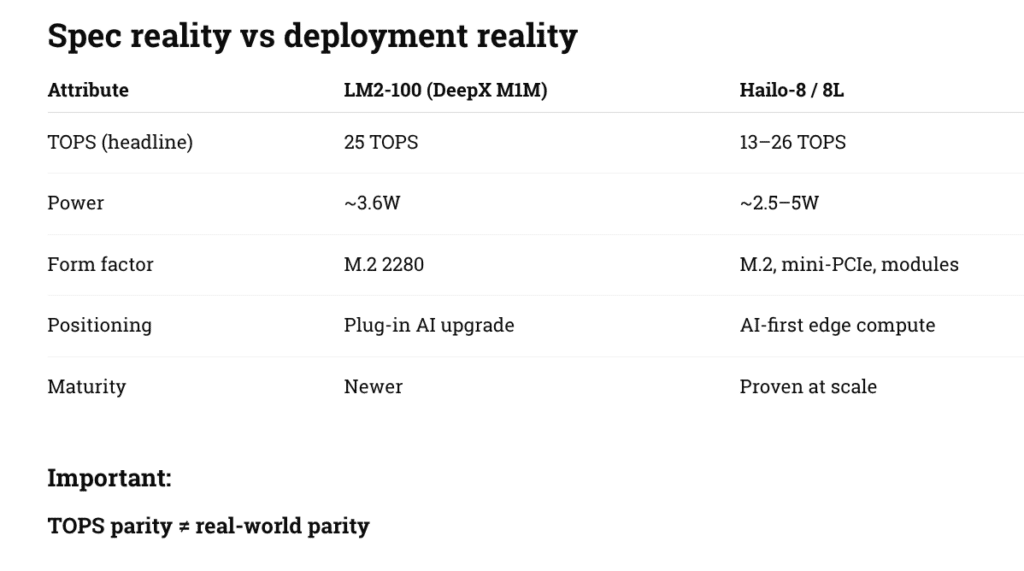
Hailo versus Giada
What actually matters in kiosks
1. Real throughput (not marketing TOPS)
LM2-100
Strong raw compute on paper
Best suited for:
single camera inference
object detection / classification
Hailo
Better sustained pipeline performance
Handles:
multi-stream video
concurrent models
real-time workloads without dropping frames
👉 Translation:
LM2-100 = “good engine”
Hailo = “better drivetrain”
2. Software stack (this is the big one)
LM2-100
Supports:
TensorFlow
PyTorch
ONNX
But:
limited field-proven toolchain
fewer pre-optimized models
Hailo
Full stack:
model zoo
compiler + quantization tools
runtime (HailoRT)
Mature ecosystem:
vision vendors
integrators
robotics + smart retail
👉 In your world:
LM2-100 = developer project friendly
Hailo = enterprise deployment ready
3. Integration into kiosk architecture
LM2-100 sweet spot
Add AI to:
existing Giada players
Intel-based kiosks
digital signage boxes
Use cases:
people counting
dwell analytics
basic fraud detection
queue monitoring
Hailo sweet spot
Design into:
new kiosks
drive-thru AI
self-checkout vision systems
Use cases:
multi-camera loss prevention
gesture + vision UX
autonomous retail
4. Power + thermals (important for enclosures)
Both are strong here:
LM2-100: very attractive at ~3.6W
Hailo: similar efficiency but better under sustained load
👉 For sealed kiosks:
both viable
Hailo has more real-world validation
5. Risk profile
LM2-100
Pros:
low cost
easy drop-in
strong specs
Risks:
newer ecosystem
unknown long-term support curve
fewer large-scale deployments
Hailo
Pros:
proven deployments
strong SDK + support
scalable architecture
Risks:
higher cost
slightly more integration effort
Strategic positioning
Where LM2-100 wins
“AI upgrade kit” for installed base
cost-sensitive rollouts
fast pilots
signage → AI conversion
Where Hailo wins
enterprise rollouts (thousands of units)
multi-modal AI kiosks
anything tied to:
revenue
shrink/fraud
compliance
Bottom line
“<strong>LM2-100 is a very compelling disruptor on price/performance.</strong><br><strong>Hailo is still the safer bet for production-scale AI infrastructure.</strong>”
Our recommendation
Use LM2-100 when:
ROI needs to be proven fast
you’re upgrading legacy kiosks
AI is “nice to have”
Use Hailo when:
AI is mission-critical
scaling beyond pilot
multi-sensor / real-time systems
What About Coral?
THE 3-TIER EDGE AI STACK
TIER 1 — EMBEDDED AI (ENTRY)
Google Coral Edge TPU
“Sensor-Level Intelligence”
~4 TOPS
~2W power
TensorFlow Lite only
✔ Ultra-low cost
✔ Proven + stable
⚠ Limited flexibility
👉 Best for fixed-function AI
TIER 2 — RETROFIT AI (MID-TIER)
LM2-100 (Giada / DeepX)
“Upgrade Your Installed Base”
25 TOPS
~3.6W power
TF / PyTorch / ONNX
✔ High performance per dollar
✔ Easy M.2 deployment
⚠ Emerging ecosystem
👉 Best for adding AI to existing kiosks
TIER 3 — AI PLATFORM (ENTERPRISE)
Hailo-8 / 8L
“AI-First Infrastructure”
13–26 TOPS
~2.5–5W
Full SDK + toolchain
✔ Scalable + production-ready
✔ Multi-stream performance
✔ Mature ecosystem
👉 Best for large-scale AI deployments
PERFORMANCE vs COMPLEXITY CURVE
Capability ↑
Hailo ███████████████████████
LM2-100 ████████████████
Coral ███████
→ Deployment Complexity
REAL-WORLD KIOSK MAPPING
Use Case | Best Fit |
|---|---|
Occupancy / people count | Coral |
LM2-100 | |
Queue analytics | LM2-100 |
Self-checkout vision | Hailo |
Drive-thru AI | Hailo |
Autonomous retail | Hailo |
SOFTWARE FLEXIBILITY
Platform | Flexibility |
|---|---|
Coral | Low (TFLite only) |
LM2-100 | Medium (multi-framework) |
Hailo | High (full toolchain) |
DEPLOYMENT STRATEGY
BROWNFIELD (RETROFIT)
Winner: LM2-100
Coral (only for simple tasks)
GREENFIELD (NEW SYSTEMS)
Winner: Hailo
LM2-100 (cost-sensitive designs)
RISK vs COST TRADEOFF
Platform | Cost | Risk |
|---|---|---|
Coral | Lowest | Lowest (simple use) |
LM2-100 | Low | Medium |
Hailo | Higher | Lowest (at scale) |
STRATEGIC TAKEAWAY
“<strong>Coral minimizes cost.</strong><br><strong>LM2-100 maximizes upgrade value.</strong><br><strong>Hailo maximizes deployment confidence.</strong>”
OPERATOR DECISION FLOW
Simple AI / fixed task? → Coral
Upgrading kiosks? → LM2-100
Building AI-driven platform? → Hailo
BOTTOM LINE
“<strong>Edge AI in kiosks is no longer one-size-fits-all.</strong><br><strong>It’s a tiered infrastructure decision.</strong>”
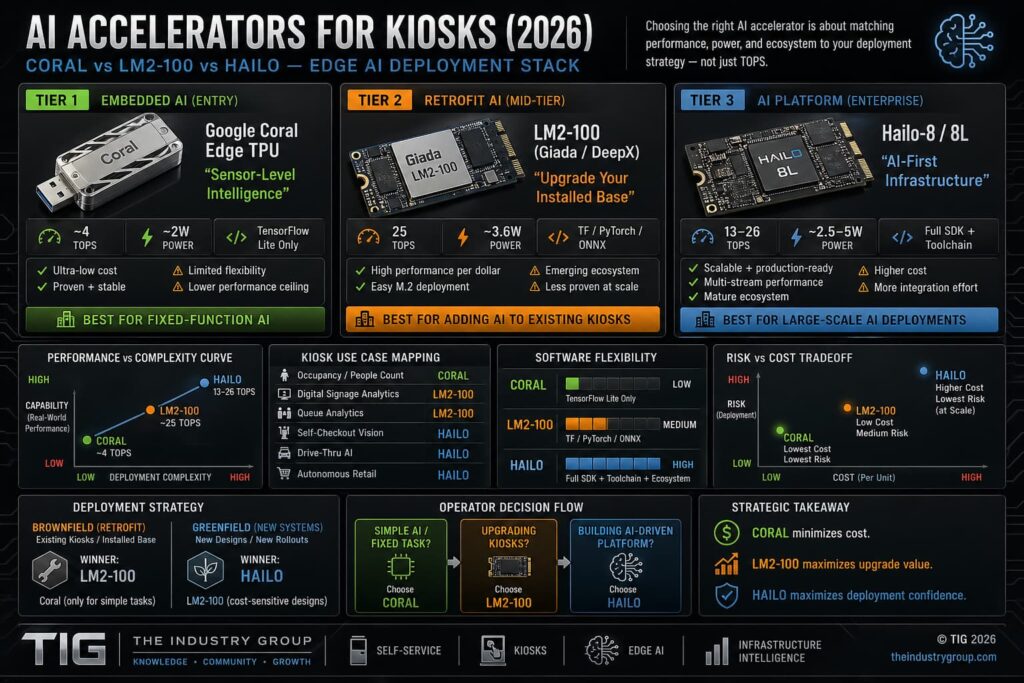
AI Accelerator Comparison – click for full size
Retrofit Links
Press Release – HIMSS 2026: Future-Proofing the Hospital Digital Front Door — Booth #3461
ADA Kiosk – Kiosk Retrofit for Usability & Accessibility Webinar
How Kiosks Meet EAA 2025 Compliance with Conversational Voice AI
Payment Kiosk News – Updating Pulse Machines with Modern Card Reader
Pick List
Older computer PC (J1900 or i5 or i3 Dell e.g.)
Edge accelerators
Touch and touchless options
Tactile interface like Audio Pad
Cameras for Vision
Gesture sensors
Height or Tilt Adjust
Latest PCI payment device (Ingenico AXIUM series)
Accessible PIN pads (tactile + audio)
Braille decals
front facing speakers?
EAA:
3.5mm headphone jack module (mandatory in many EU interpretations)
Tactile keypad (PIN entry + navigation)
Speakers + amplified audio
Microphone array (optional but increasingly expected)
Braille-labeled keypad
Raised tactile navigation buttons
Physical “start accessibility mode” button
Dot Inc. refreshable braille (emerging)
Haptic feedback modules
Audio confirmation systems
Reach ranges (typically ~15”–48”)
Knee/toe clearance
Approach space for wheelchair
Ideal
Multimodal (voice + touchless + tactile)
AI-assisted interaction (guidance, translation)
Dynamic UI adaptation per user
Software layer:
TPGi screen reader / TTS
Audio navigation prompts
High-contrast UI modes
Larger font rendering (software)
Anti-glare / high-brightness displays
Optional: adjustable height or tilt mechanisms
BOCA Systems printers
2D barcode / QR scanners
Cameras (AI vision, identity, telehealth)
Receipt printers, speakers
4G/5G modems & routers
IoT gateways
Remote monitoring modules
LG Electronics webOS players
BrightSign
Android media boxes
And Then There is Dragonwing
Where Dragonwing wins vs loses
Wins
Power efficiency
Cost (fewer components)
AI-native workloads (vision, voice, multimodal)
Always-connected devices
Loses
Enterprise IT compatibility (Windows ecosystem)
Long lifecycle predictability (Intel still stronger)
Upgradeability (monolithic design risk)
“<strong>Dragonwing is not competing with Intel CPUs directly — it is competing with the entire Intel + GPU + AI accelerator stack.</strong>”
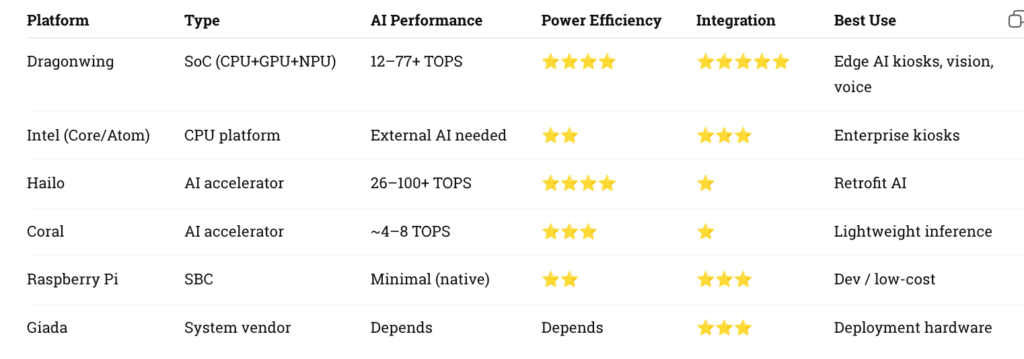
dragonwing compare
Pro Tip -- Sometimes it makes more sense to replace. You can make the argument between Intel and AMD but to date AMD still suffers from "zombie syndrome" when it comes to remote monitoring. For a large enterprise that is unacceptable. Stick with company like Giada and see all the options.
Author: Craig Allen Keefner
With over 40 years in the industry, Craig is considered to be one of the top experts in the field. Kiosk projects include Verizon Bill Pay kiosk and thousands of others. Craig was co-founder of kioskmarketplace and formed the KMA. Note the point of view here is not necessarily the stance of the Kiosk Association or kma.global -- Currently he manages The Industry Group